

FLEXIGRANT FEATURE
AI Due Diligence:
The Work of 3 tabs in One Place
Checking one applicant has meant Companies House in one tab, the Charity Commission in another, and the Scottish Charity Regulator in a third. The depth of the check depended on whoever ran it. Our new AI Due Diligence Checker feature runs the same check from one search inside your grant management system.
Three browser searches down to one inside your system
The case for the checker fits in one table. Time saved, and consistency gained.
What does the AI Due Diligence Checker check?
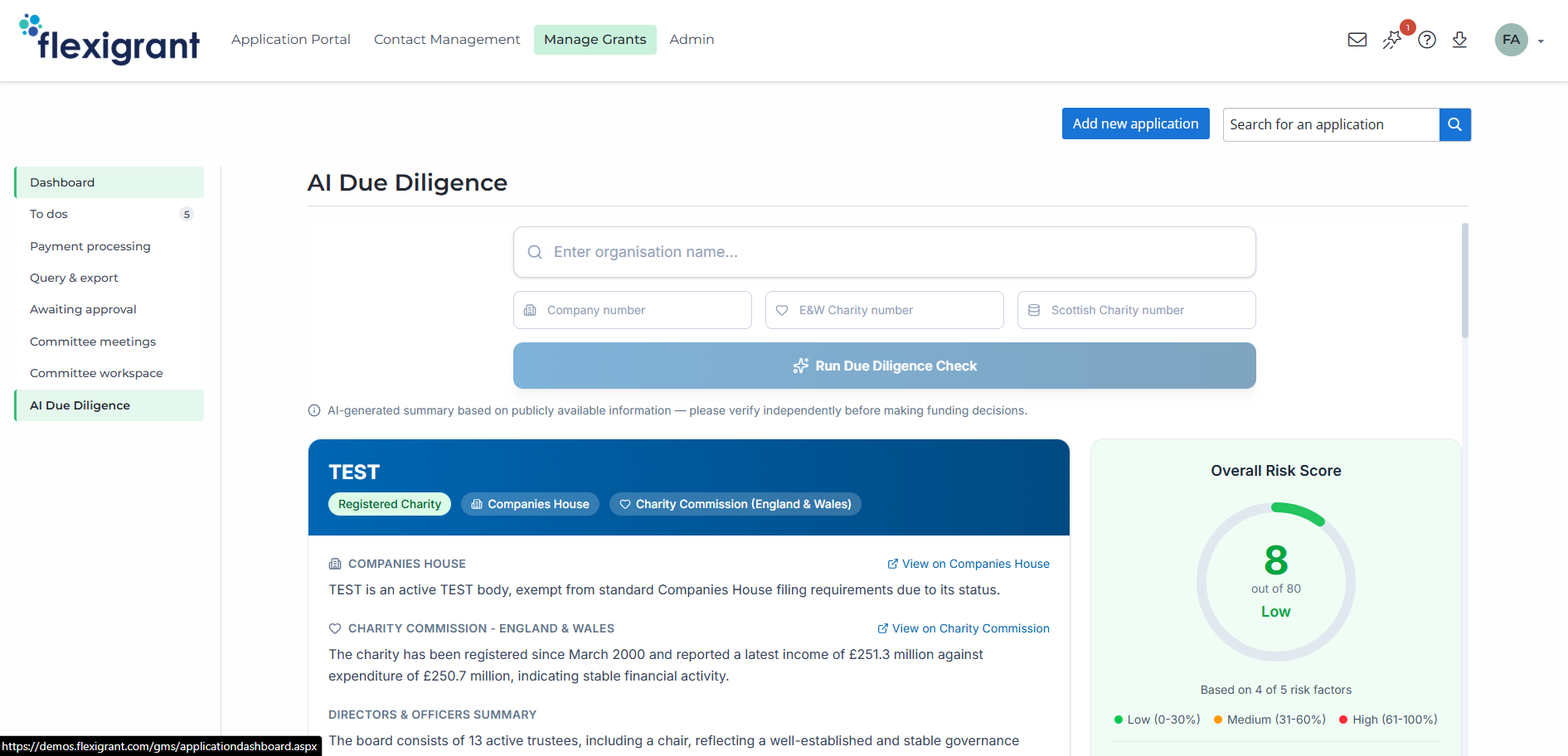
Enter an organisation's name, plus a company or charity number where you have one. We recommend adding the number, because organisations are often registered under a slightly different name. Flexigrant retrieves the record straight from Companies House, the Charity Commission for England and Wales, and the Scottish Charity Regulator (OSCR), and shows it on one screen next to the risk score.
Company or charity status
Financial data:
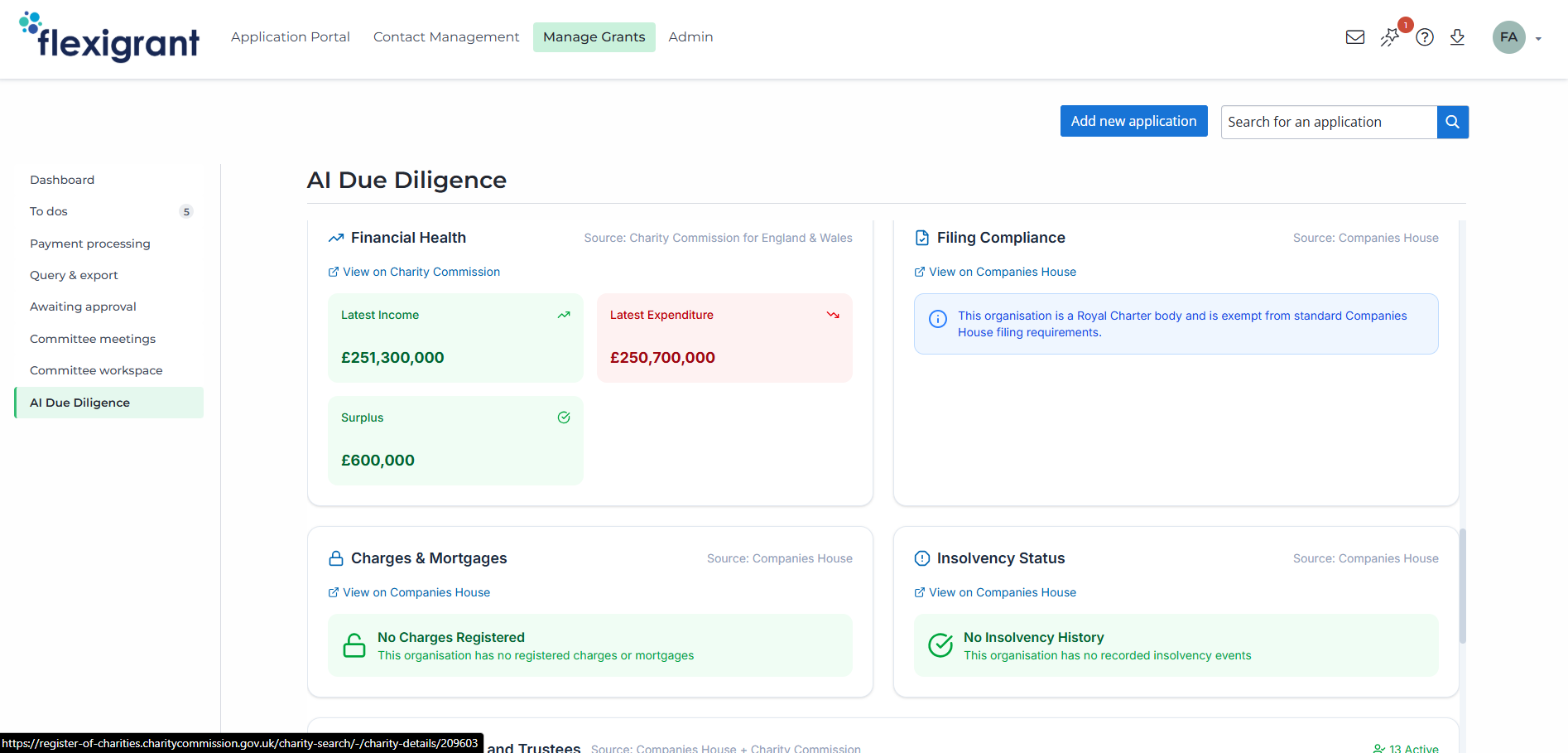
income, expenditure, and accounts
Charges summary and insolvency data
Directors and trustees
Every section labelled by register and linked to the source record
Important: The two charity registers are separate bodies, so each gets its own labelled summary. The Scottish register is checked when a Scottish charity number is included in the search.
Why check inside your grant management system?
Funders face growing scrutiny on where money goes. Boards, auditors, and the public increasingly expect an answer to the same question: what did you check before you awarded, and can you show it? Skipped or shallow checks are how funding reaches organisations that cannot deliver.
A standalone due diligence tool answers with another login, another export, and another place for evidence to live. The checker answers inside Flexigrant, part of grant management software that runs your whole process, so the check happens where the application already lives and the result stays with the record your team assesses.
How does the risk score work?
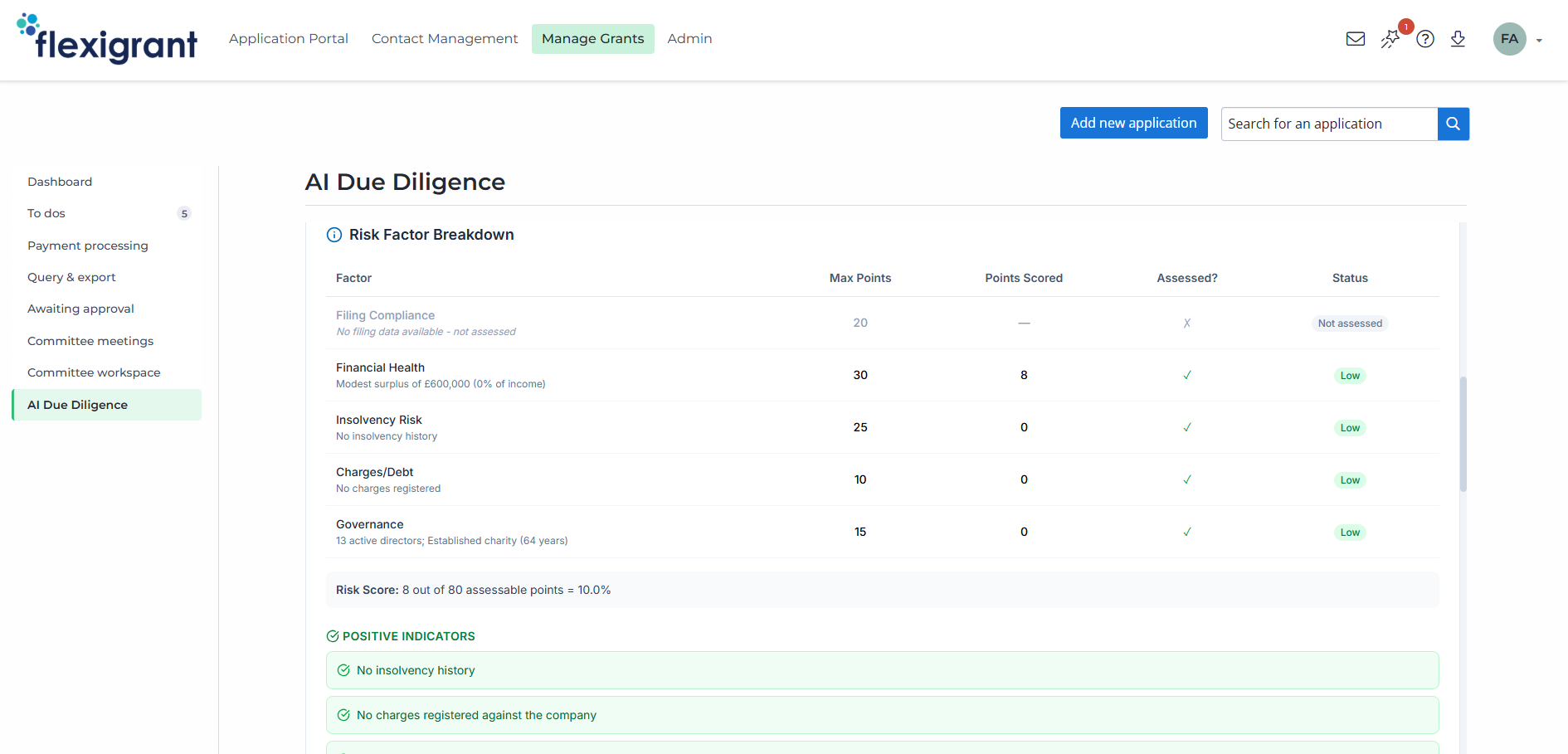
The risk score comes from a fixed formula, not from AI, and only from factors backed by verified register data. Each factor is weighted by importance, and the weighting is shown on screen next to the score.
Filing compliance
Checks whether accounts or a confirmation statement are overdue, from the Companies House profile. Late filings are often the first visible sign that something needs a closer look. Weighted at 20% of the score.
Financial health
Looks at the surplus or deficit ratio, from the charity's income and expenditure data. This is the most heavily weighted factor, at 30% of the score.
Insolvency risk
Flags active insolvency or insolvency history, from Companies House insolvency data. This is the record you want surfaced before an award, not after. Weighted at 25% of the score.
Charges and debt
Counts outstanding charges and checks whether any are floating charges, from Companies House charges data. Charges show who else holds a claim on the organisation's assets. Weighted at 10% of the score.
Governance
Reviews director count, turnover rate, and company age, from officers and trustees data. A small or fast-changing board is worth knowing about before you fund. Weighted at 15% of the score.
Where does it sit in your pre-award process?
Run the check when an application arrives, before assessment begins. The result gives your team a documented starting point, and because it sits inside your grant management software, it stays with the application through review, approval, and award.
The decision stays yours: the checker gathers and scores what the registers hold, while your policies, thresholds, and judgement do the rest.
Where does the AI run, and what does it see?
AI does two jobs in this feature, and only two: it writes the plain-English summary of the register information, and the analysis notes beside it. The notes might describe a board as stable, or draw attention to a deficit. They are labelled as AI-generated on screen and should be checked against the linked source records. The register data and the risk score are never AI-generated.
No data held in your grant management system is used: only the name and numbers you type into the search
Processed through Azure OpenAI within the European Union, and never used to train AI models.
Microsoft abuse monitoring may store a sample of flagged content, reviewed within the European Economic Area
Your grant records keep Flexigrant's UK data hosting: the EU processing applies only to this AI step
See it against your own process
The fastest way to judge the AI Due Diligence Checker is to watch it handle the checks your team runs today. Book a demo built around your grant process, and see where it fits, from first search to funding decision. Prefer to test it on real work? The demo is also the route to the fully featured two-week free trial.
Frequently Asked Questions
The AI Due Diligence Checker is a Flexigrant feature that runs due diligence checks on grant applicants against UK public registers from one search. It shows status, finances, charges, insolvency, and directors alongside a clear risk score, with links to every source record.
Three: Companies House, the Charity Commission for England and Wales, and the Scottish Charity Regulator (OSCR). The Scottish register is checked when a Scottish charity number is included in the search, and every result is labelled with the register it came from.
No. The risk score is calculated by a fixed formula from verified register data. AI is used only to write the plain-English summary and the analysis notes, both clearly labelled as AI-generated on screen.
Low is 0 to 30%, Medium is 31 to 60%, and High is 61 to 100%. The score is a percentage of the factors that could actually be assessed for that organisation, and a breakdown shows how each factor contributed.
No. The only data the checker uses is the organisation name and the company or charity numbers typed into the search. Nothing held in your Flexigrant system is sent to the feature.
The AI step runs on Azure OpenAI, with prompts and responses processed within the European Union and not used to train AI models. Microsoft operates abuse monitoring, so a sample of flagged content may be stored and reviewed within the European Economic Area.
By default, any user with access to the Manage Grants dashboard. A dedicated role can restrict the checker to particular users or teams; raise a support ticket and our team will apply it.
Yes. A tenant setting switches the checker off entirely for your organisation. Raise a ticket through the support portal and we will disable it for you.
No. The score and summary are advisory: they give you a documented starting point and a consistent view across applicants. The underlying register records are linked from every section and should always be reviewed before a funding decision.
The checker is included in every Flexigrant subscription, whatever the tier. Flexigrant pricing is based on the size and complexity of your grant programmes: see the pricing page for current tiers, or book a demo for a tailored quote.
Talk to a real person about your grant programmes
DISCOVER MORE ABOUT FLEXIGRANT
NGOs and Nonprofits
Cut admin time. Reduce missed deadlines. Report with confidence.
Central and Local Government
Public accountability, built in.